Best Lacerte Tax Software Hosting Providers for CPA Firms (2026 Comparison)
Every CPA firm has to deal with a moment when everything seems to be scattered. Files are stuck on a common system, and various preparers are waiting for their turn to arrive. The server, which is crucial at that moment, seems to be slowing down.
And this is the exact moment when the idea to consider Lacrete turns out to be most important. But at that time, one has to struggle while regretting things. Make sure this won’t happen to you.
Below is a detailed comparison of the best Lacerte tax software hosting providers for CPA firms. Select the best one for you so that your firm keeps working smoothly in every situation of the market.
Key Takeaways
The five best Lacerte tax software hosting providers in 2026 are Verito, Rightworks, Ace Cloud Hosting, Apps4Rent, and Quick Cloud Hosting.
The support for multi-preparer concurrent access, the ability to co-host QuickBooks Desktop, and hands-on e-file configuration experience differentiates the Lacerte-ready host from a generic cloud provider.
Choosing one of the best Lacerte tax software hosting providers is crucial for the CPA firms to keep growing without struggling with stressful months.
What to Look for in a Lacerte Hosting Provider
Lacerte has technical requirements that generic cloud providers frequently misconfigure or cannot support at the support-team level.
Network return processing, multi-preparer parallel access, and e-file submission all behave differently in a hosted environment than they do on a local office machine. Evaluating a host purely on price or uptime numbers misses the factors that define whether Lacerte actually performs the way your firm needs it to during peak season.
These are the criteria that matter specifically for Lacerte, and the questions to ask before signing anything.
Dedicated vs. Shared Server Infrastructure
A dedicated private server means your firm’s Lacerte installation, client data, and functions run on hardware built exclusively for your use.
No other firm shares your CPU, RAM, or storage pool. A multi-tenant virtual desktop infrastructure (VDI), by contrast, places multiple clients on shared compute resources where your performance during a heavy batch run depends on what other tenants happen to be handling at the same moment.
For tax firms handling complex returns under concurrent workloads between February and April, dedicated infrastructure is not an upgrade tier. It is the baseline for steady performance.
Ask any prospective host to confirm in writing whether Lacerte runs on a customized or shared environment, because the language in marketing copy often blurs this distinction.
Multi-Preparer Concurrent Access and Fast Path
Lacerte’s multi-user operation in a hosted environment requires Intuit’s Fast Path license. Without it, concurrent user activity is blocked at the application level, meaning preparers must queue repeated access to the same return rather than working simultaneously.
Any provider claiming multi-preparer Lacerte hosting should be asked specifically whether their environment is configured for Fast Path and whether that license cost is separate or included.
QuickBooks and Lacerte on the Same Dedicated Server
Most CPA firms run QuickBooks Desktop alongside Lacerte. Co-hosting both applications on the same private server takes away the manual export-import cycle between the two platforms.
Client financials in QuickBooks become directly related to Lacerte without file transfers, version conflicts, or synchronization delays. Not every hosting provider supports this configuration on a single server instance.
Confirm it before committing to a plan, because the operational difference is key during returns that require pulling QuickBooks data mid-preparation.
E-File Configuration and Compliance Baseline
E-file submissions from hosted Lacerte require specific port-level network settings and IRS connectivity configuration on the server side.
A support team that has set up Lacerte e-file hundreds of times handles this during onboarding without friction. A general cloud host that happens to support Lacerte may require multiple updates to configure the same thing correctly.
Ask directly whether the host’s support staff has configured Lacerte e-file submissions specifically, not just whether the application runs in their environment.
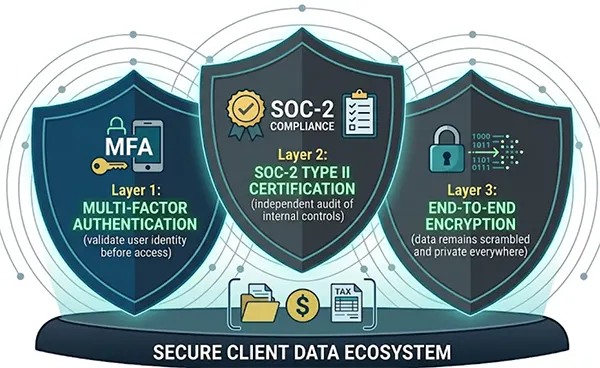
On the compliance side, the minimum security stack for CPA firm data is SOC 2 Type II certification, AES-256 encryption at rest and in transit, MFA on every login, and nightly automated backups with at least 60 days of preservation.
According to IBM’s Cost of a Data Breach 2024 Report, the average cost of a data breach in the financial services sector reached $6.08 million, a number that turns compliance documentation from a checkbox into a business continuity question.
This amount, which is 22% more than the $4.88 million global average for all industries, is a substantial financial burden brought on by lost revenue, business errors, and post-breach response expenses.
Firms operating under IRS Publication 4557 and the FTC Safeguards Rule should confirm their host provides written documentation for both, not just a checkbox in a sales deck.
The 5 Best Lacerte Cloud Hosting Providers in 2026
The providers below span a range of infrastructure models, price points, and support profiles. The ranking indicates performance on the Lacerte-specific criteria above. Each has a clearly defined use case, and the right option depends on firm size, compliance obligations, and work volume during filing season.
1. Verito: Best for Dedicated Servers and Intuit Ecosystem Expertise
Verito’s most important differentiator has nothing to do with marketing language. Every client, on every plan, runs on a dedicated private server.
There is no shared tier, no multi-tenant VDI, and no upgrade required to access private infrastructure. This is Verito’s operating model, applied across all configurations.
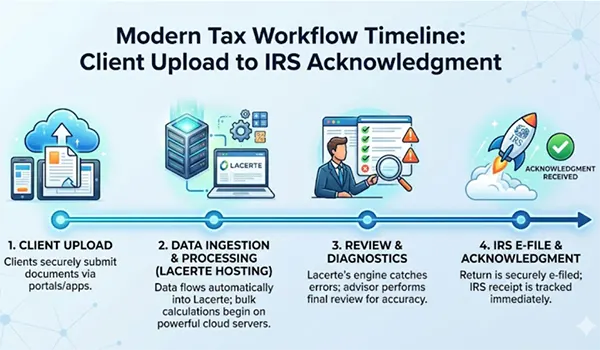
For Lacerte specifically, Verito’s support staff is trained on tax software environments, not just remote desktop access. They configure Lacerte’s network return processing as part of onboarding, set up e-file submissions with the correct IRS connectivity settings, and build server environments where Lacerte and QuickBooks Desktop run on the same instance.
Client financials flow between both applications without manual switching steps. This is the kind of setup that takes a general cloud host days of escalation to replicate, if they can replicate it at all.
Pricing is published and consistent. The Essentials plan starts at $69/user/month with 10GB dedicated RAM, 40GB NVMe SSD storage, and two added apps. The Pro plan runs $99/user/month with 15GB RAM and 100GB NVMe storage. The Elite plan covers unlimited RAM, storage, and applications at $149/user/month.
All plans are month-to-month with no annual contract needs. The one-time server setup fee is $200, white-glove migration is included, and most firms are live within 48 hours of starting the migration process.
Security credentials include SOC 2 Type II certification, AES-256 encryption, MFA enforcement on every login, nightly automated backups with 60-day retention on Essentials. Above this, Pro plans and 90-day retention on Elite, and a 100% uptime SLA backed by U.S.-based Tier IV data centers.
Phone and chat support run 24/7 from technicians who understand the difference between a Lacerte diagnostic error and a server connectivity issue.
Verito has served more than 1,000 tax and accounting firms since 2016 and is represented on the Forbes Technology Council. Firms that want to compare special server configurations, confirm QuickBooks co-hosting support, and review Lacerte-specific infrastructure details can explore Verito’s Lacerte hosting plans directly.
Best for: CPA firms and tax practices that need customized infrastructure, IRS Publication 4557 and FTC Safeguards compliance documentation, and support staff who understand Lacerte’s technical environment end-to-end.
2. Rightworks: Best for Intuit-Native Integration
Rightworks is Intuit’s officially endorsed hosting partner. Intuit’s own product pages for Lacerte and ProSeries reference Rightworks for desktop hosting, which carries institutional acknowledgment that independent providers do not have.
If having Intuit’s endorsement in your vendor stack is important to your firm’s due diligence process, Rightworks is the only option that meets that necessity.
The hosting environment is modified specifically for the Intuit application suite. Lacerte workflows, ProSeries returns, and QuickBooks Desktop operate within a cloud VDI built around these applications rather than retrofitted for them. The learning curve for preparers migrating from local Lacerte installations is minimal.
Pricing starts at $85 per user per month. Rightworks positions at the premium end of the market. One licensing detail worth noting before signing: Microsoft Office combination with hosted Lacerte in the Rightworks environment requires an existing enterprise-tier Office 365 license. Firms that do not already carry that license will encounter an additional cost that is not readily apparent from the product description.
Data backups run nightly with 90-day snapshot retention replicated to an offsite facility. Rightworks maintains IRS Security Six compliance.
Best for: Established firms operating fully within the Intuit ecosystem that prioritize official vendor endorsement and where per-user cost is a secondary thinking.
3. Ace Cloud Hosting: Best Budget Option
Ace Cloud Hosting supports the full Intuit application suite, including Lacerte, ProSeries, QuickBooks Desktop, and ProConnect, alongside a wide range of third-party applications including TaxDome, Dext, and Adobe.
For firms that need Lacerte to coexist with several other platforms in one hosted environment, Ace Cloud’s application coverage is one of the widest available.
Pricing starts around $74.69/user/month, with standard rates customized by quote. A 7-day free trial requires no credit card. The platform offers a mix of shared cloud and standalone server options depending on the plan tier.
The important trade-off to flag: shared infrastructure means that performance during peak periods depends on load distribution across active tenants.
Firms processing high volumes of Lacerte returns jointly between January and April should clarify the specific server environment tier before signing.
The gap between a shared and exclusive configuration matters at the exact moments when performance pressure is highest.
Best for: Smaller tax practices that want broad Intuit application support at a friendly entry price and have a lower volume of concurrent preparers during peak season.
4. Apps4Rent: Best for Virtual Desktop Flexibility
Apps4Rent offers Lacerte hosting within a virtual desktop environment at one of the lowest entry points in this comparison.
The VDI model gives firms running multiple non-Intuit applications alongside Lacerte ample configuration flexibility within a Windows-based hosted desktop.
QuickBooks Desktop co-hosting is supported, and 24/7 technical support is available. Current pricing should be confirmed directly with Apps4Rent’s support team, as their sales structures change regularly.
The performance consideration for VDI hosting mirrors the shared infrastructure point above: firms with two or more preparers running concurrent return processing during peak filing should understand the difference between a VDI environment and a special private server before making the move.
Best for: Solo practitioners and first-time cloud hosting users for whom advance cost is the primary filter and whose Lacerte workload is lower in volume.
5. Quick Cloud Hosting: Purpose-Built for Solo Lacerte Practices
Quick Cloud Hosting is a Lacerte-compatible cloud hosting provider suited to practices that have Lacerte as their primary or only application.
It is a smaller-scale provider in comparison to Verito or Rightworks. QuickBooks Desktop compatibility is confirmed, and phone and chat support are on offer.
Compliance certification documentation is less typically published than with the larger providers in this list. For solo practitioners or two-person practices with lower regulatory complexity and lighter concurrent-user standards, Quick Cloud Hosting is a functional entry-level option.
Best for: Solo or dual-user Lacerte practices that want accessible hosted tax software without multi-user infrastructure limits.
Provider Comparison at a Glance
Provider
Infrastructure
Starting Price
Lacerte + QB Co-host
Uptime SLA
Best For
Verito
Dedicated private server
$69/user/month
Yes, same server
100%
CPA firms needing compliance + performance
Rightworks
Cloud VDI (Intuit-endorsed)
$85/user/month
Separate license req.
Not published
Intuit-native firms
Ace Cloud Hosting
Shared / dedicated tiers
$74.69/user/month
Yes
99.9%
Budget-focused practices
Apps4Rent
Virtual desktop
Contact for pricing
Yes
99.9%
Solo / first-time cloud users
Quick Cloud Hosting
Shared cloud
Contact for pricing
Yes
99.9%
Solo Lacerte-only practices
How Lacerte Hosting Actually Works in a Live Tax Environment
The most persistent objection to moving Lacerte off a local machine is the performance question: will a remote desktop session bring out the kind of lag that disrupts the rhythm of high-volume return preparation? The honest answer is that the objection is valid for improperly configured environments and irrelevant for well-configured dedicated ones.
The IRS processed more than 150 million individual tax returns in the 2023 filing season, and a major portion of those were prepared on cloud-hosted tax platforms by firms that have already settled this question for themselves.
The performance ceiling of hosted Lacerte has been tested at scale across thousands of sessions. The variable is not the cloud model itself. It is the infrastructure and the configuration behind it.
The Interface Does Not Change
Preparers log in via Remote Desktop Protocol (RDP) from any device running Windows, macOS, a tablet, or a mobile phone, with a minimum 10 Mbps connection preferred. The Lacerte interface that opens is identical to the local installation: same forms, same diagnostic tools, same keyboard shortcuts, same e-file submission workflow. No overhaul, no new software, no revised muscle memory.
Updates Stop Being the Firm’s Problem
When Intuit releases a new Lacerte version or a mid-season patch, the hosting provider deploys it to the server and verifies the application is effective before end users log back in. The firm does not schedule downtime, initiate the update, or follow the patch process. This extends to operating system updates and antivirus definitions.
Network Return Processing Must Be Set Up Correctly
This is the configuration step that separates Lacerte-specialist hosts from general cloud providers. Network return processing coordinates how multiple preparers queue and access returns proactively without overwriting each other’s work.
Providers that enable RDP access to Lacerte but do not configure the network return processing setup correctly create silent multi-user failures that surface during peak season, not during initiation.
Ask any prospective host to confirm this is part of their setup checklist, and ask whether someone on their support team has done it specifically for Lacerte, not just for a generic Windows application.
According to a 2023 survey by the American Institute of CPAs, technology infrastructure was among the top operational investment goals cited by CPA firms with fewer than 20 professionals, a finding consistent with the common trend of smaller firms moving core tax applications off aging on-premise servers and onto managed hosted environments.
The Bottom Line
At the end of the day, what matters the most is control. Rather than wasting April because of some common file and system failures in March is not a suitable condition for a growing firm.
Lacerte provides more control on the local server side and allows the firm to move to cloud hosting with a Lacerte-compatible hosting provider. This not only turns out to be a technological upgrade, but it also effectively reduces the infrastructure risk from the months of the year that are most crucial for a firm to grow.
Furthermore, every CPA firm should compare the best Lacerte tax software and choose a sone suits their needs.
Frequently Asked Questions
1. Can I host Lacerte in the cloud instead of running it on a local server?
Yes. Lacerte is a Windows-based desktop application that installs and runs on a cloud-hosted isolated server. You access it via a remote desktop session from any internet-connected device.
The interface, forms library, and workflow are similar to a local installation. Your existing Lacerte license stays with you; the hosting provider supplies the server environment, not the software itself.
2. What is the difference between dedicated and shared Lacerte hosting?
On a specific private server, your firm’s Lacerte instance runs on hardware designed exclusively for your use. No other clients share your CPU, RAM, or storage. On a shared or multi-tenant VDI, multiple firms share the same central compute resources.
For firms running concurrent return processing during tax season, dedicated infrastructure delivers consistent, inevitable performance regardless of external tenant load.
3. Can Lacerte and QuickBooks Desktop run on the same hosted server?
Yes, when the hosting provider supports co-installation on a single server instance. Running both applications on the same customized server means client financials in QuickBooks are directly accessible to Lacerte without manual export and import steps.
Providers like Verito support this configuration as part of their standard shared environment setup, not as a custom add-on.
4. Do I need to manually update Lacerte in a hosted environment?
No, with most verified hosting providers. Annual Lacerte version releases and mid-year patches are deployed by the provider on the server side.
Confirm this is included in the plan before signing, since some providers treat version upgrade assistance as a separate billable service event rather than standard maintenance.
5. How does Lacerte’s e-file configuration work in cloud hosting?
E-file submissions from a hosted Lacerte environment work very similarly to a local installation when the server has been correctly configured with the required port settings and IRS connectivity parameters.
The difference between providers is at the support level. Hosts with Lacerte-specific expertise do this during initial server setup as a standard step. General cloud providers may take longer to diagnose and resolve e-file issues because their support teams are not trained on Lacerte’s specific criteria.